AI Chief of Staff

60+ AI workflows, unified into an executive operating system. Connected to every tool I already use — calendar, email, chat, tasks, docs, and more.

By Aaron Neinstein

What is this?

The AI Chief of Staff is a system of AI agents that work together as an executive operating system — preparing me for meetings, tracking who owes what to whom, scanning for emerging issues across the company, managing content and publishing, and synthesizing everything into a daily operating rhythm. It doesn't replace thinking. It removes the friction so I can focus on what actually matters.

🧠

Knowledge Layer

A set of structured files that teach the AI who I am, how I work, my team, my priorities, and the tools I use. This is the foundation — when I update my quarterly priorities, every agent in the system immediately shifts its behavior without being individually retrained.

Skills (Workflows)

Reusable workflows I trigger with a single command — each one solves a specific recurring problem like meeting prep, daily briefing, weekly review, delegation tracking, or content editing. Think of them like macros, but intelligent.

🔌

Connectors

Direct integrations that let the AI read and write to my existing tools — calendar, Slack, task manager, wiki, email, and more. No copy-pasting, no switching tabs. The AI goes to the source.

🔄

Operating Rhythm

Daily and weekly rituals that compound over time. A voice memo I record in the evening feeds the next morning's briefing, which feeds meeting prep, which feeds an end-of-day action sweep, which feeds the next day. Each step makes the next one smarter.

See It In Action

Here's what the system actually looks like when I use it day-to-day. These are real outputs from my live system.
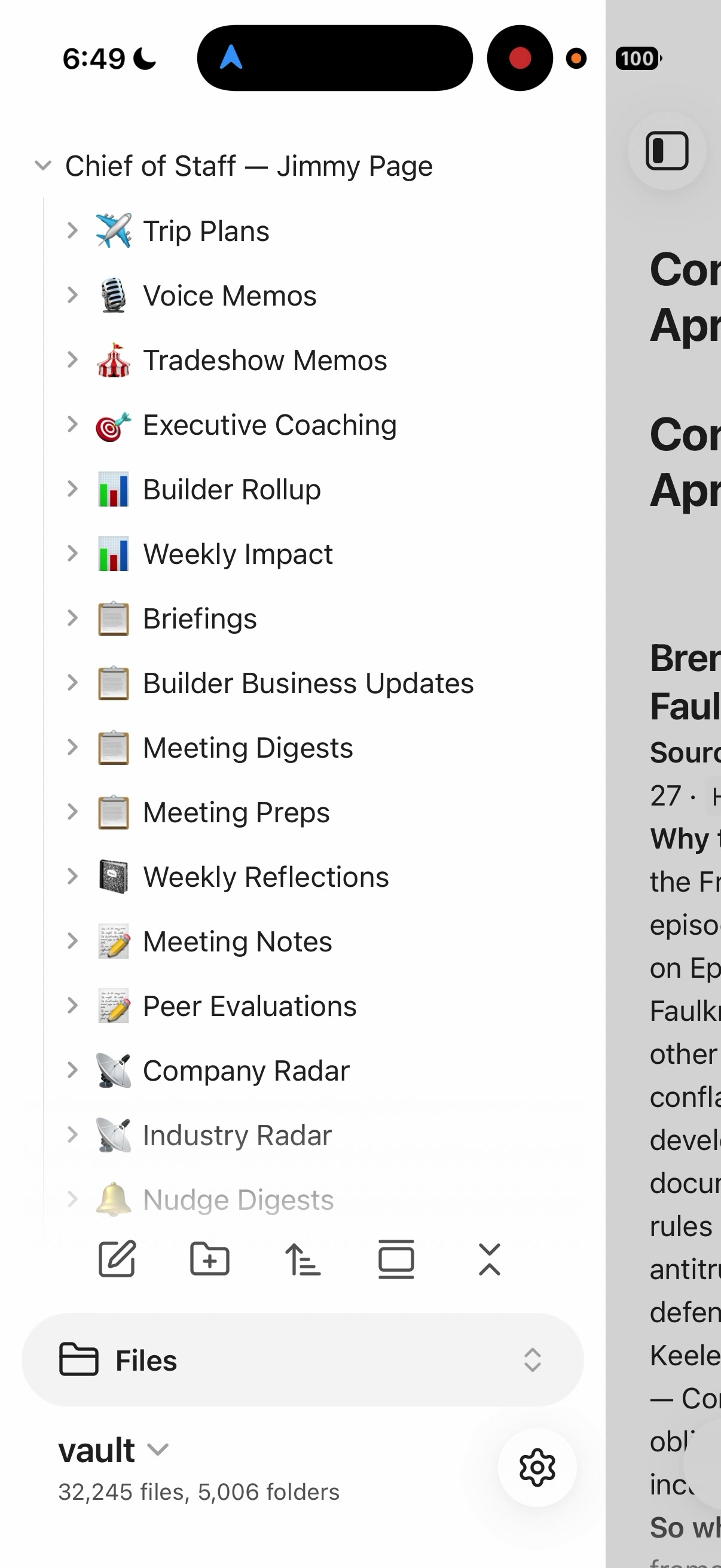
The AI Chief of Staff system sidebar showing all workflow categories
The System All workflows organized under one roof — from voice memos and briefings to meeting prep, coaching, and radar.
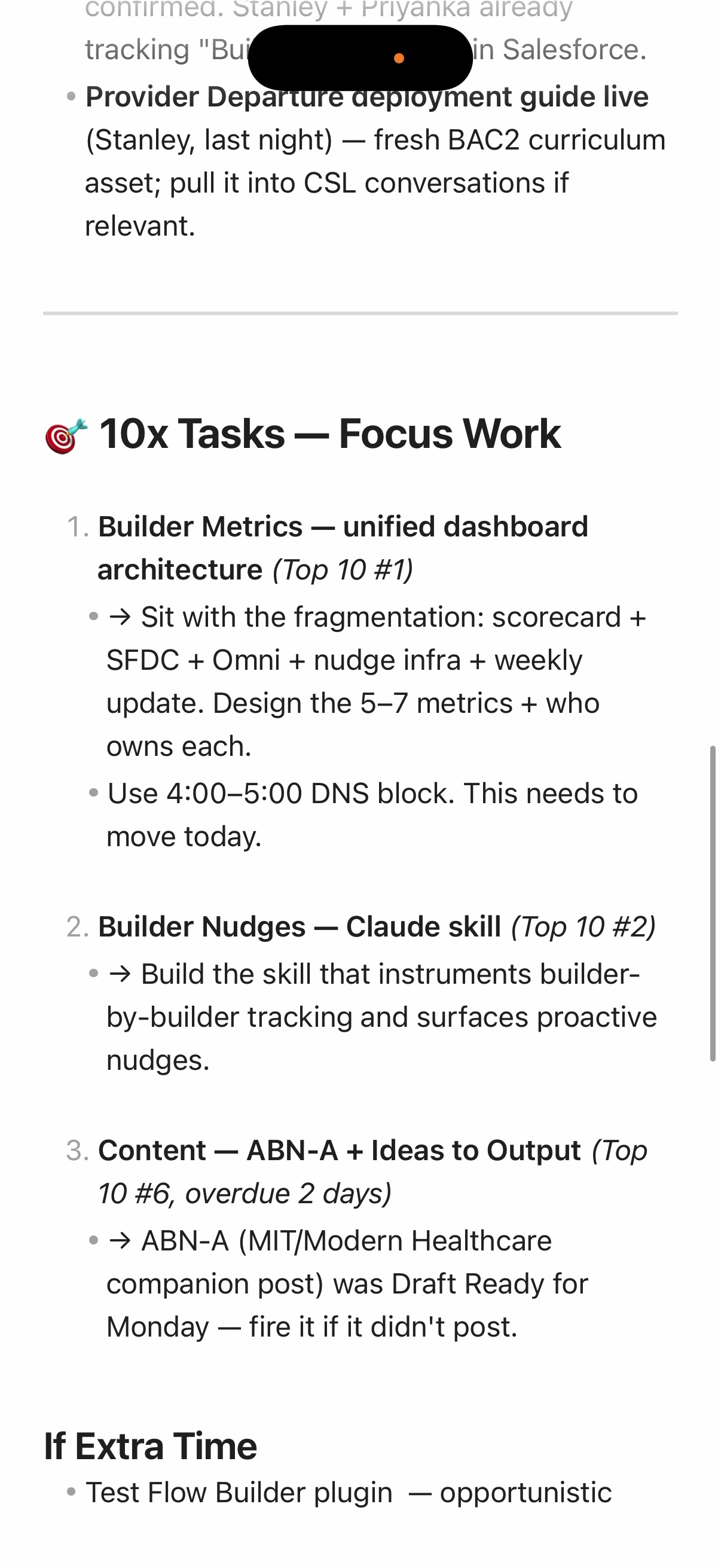
Daily briefing showing prioritized focus tasks for the day
Daily Briefing Top priorities for the day, pulled from my task manager and linked to my Top 10 weekly goals.
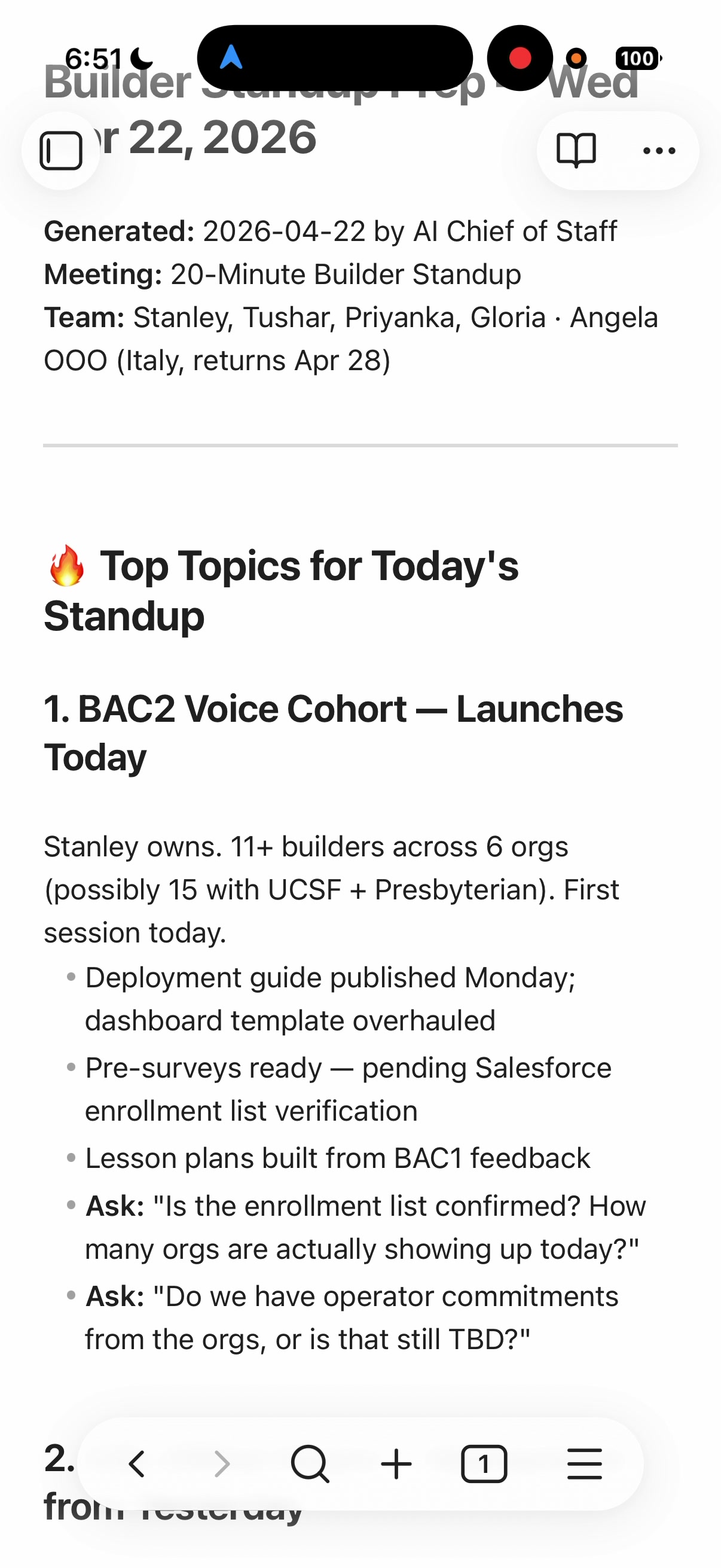
Meeting prep document with top topics and discussion questions
Meeting Prep Before each meeting — key topics, context, and the specific questions to ask. Generated automatically.
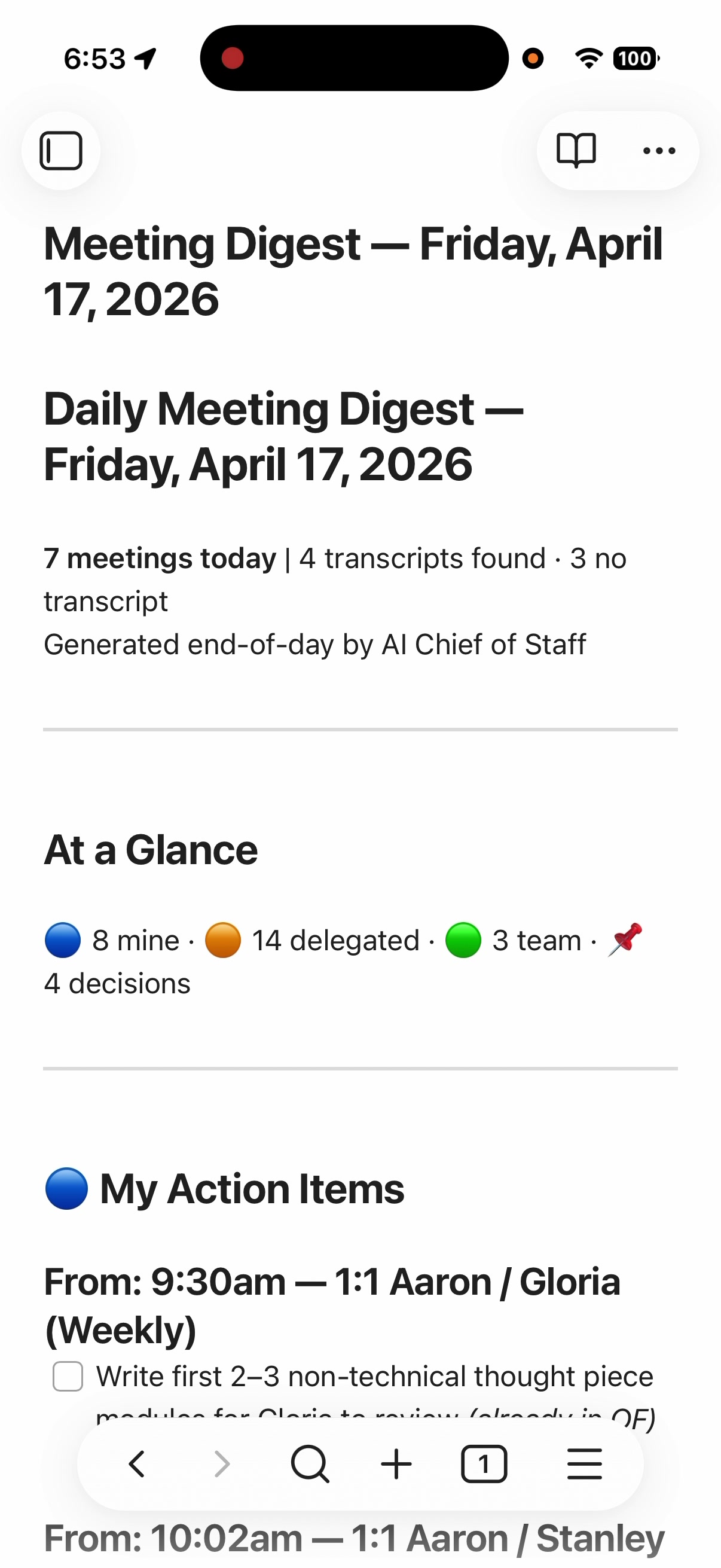
End-of-day meeting digest showing action items extracted from transcripts
Action Sweep End-of-day digest: 7 meetings scanned, 8 action items mine, 14 delegated, 4 decisions captured.
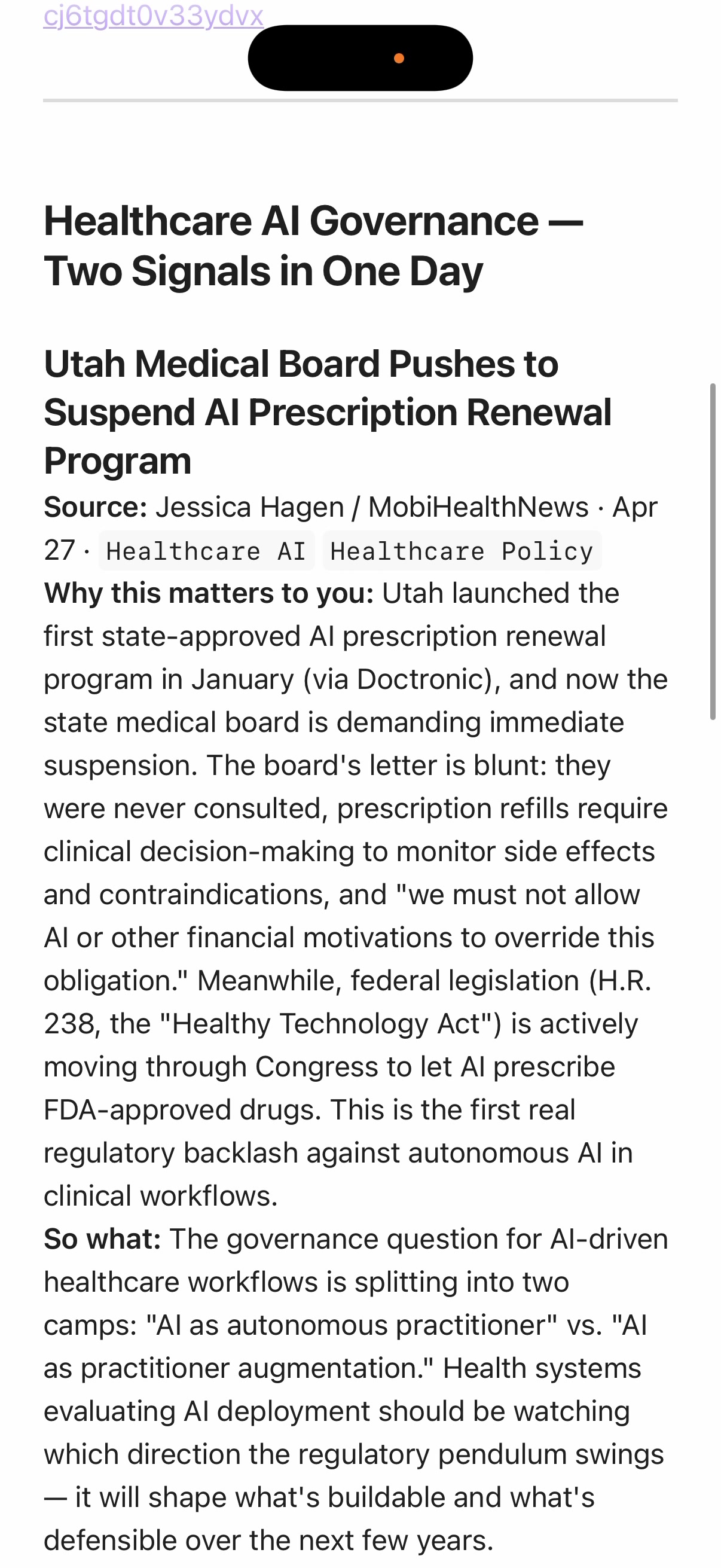
Industry radar analysis of healthcare AI governance signals
Industry Radar Daily scan of newsletters and articles, with analysis of why each item matters to my work.

Watch a 5-minute walkthrough of the live system:

▶ Watch the Demo on LinkedIn

How It Works

Four layers working in a loop: my existing tools feed data into the AI engine, the engine draws on a knowledge layer I've built about how I work, and it produces outputs that flow back into the tools I already use. The loop gets smarter over time.

My Existing Tools

Calendar · Slack · Task Manager · Wiki/Docs · Email · RSS Reader · Cloud Storage · Notes

▼ Direct Integrations ▼

AI Engine + 60+ Workflows

Meeting prep · Daily briefing · Delegation tracking · Company radar · Industry scan · Content editing · Coaching

▼ Reads & Writes ▼

Knowledge Layer

Who I am · How I work · My team · My priorities · My tools · Voice memos · Weekly reflections

▼ Produces ▼

Outputs

Meeting preps · Briefings · Action items · Delegation nudges · Content drafts · Intelligence reports · Tasks

What It Does

The system is organized into six functional domains. Each workflow pulls live data from connected tools, applies everything the system knows about me and my priorities, and produces a ready-to-use output.

☀️

Daily Operations

  • Morning briefing — reads my calendar, top priorities, overnight Slack messages, and last night's voice memo to produce a one-page day plan before I start work
  • Meeting prep — before each meeting, gathers shared notes, recent decisions, open threads, and team context. Auto-detects whether it's a coaching 1:1 or a coordination meeting and adjusts the format accordingly
  • End-of-day action sweep — reads through every meeting transcript from the day and extracts the commitments I made, turning them into tasks so nothing falls through the cracks
  • Friday close-out — guided weekly reflection with a wins inventory, priority review, and Top 10 planning for the following week. Feeds Monday's orientation briefing
📡

Intelligence & Radar

  • Company radar — scans internal chat threads, call recordings, and team documents to surface conversations where my input is needed, wins I should amplify, or problems emerging before they escalate
  • Industry radar — daily scan across newsletters, RSS feeds, and saved articles to surface the 3-5 things most relevant to my work, with weekly synthesis of themes and patterns
  • Proactive alerts — the system runs on a schedule throughout the day, so emerging issues surface to me even when I'm not actively looking for them
📋

Delegation & Follow-Up

  • Delegation nudges — tracks items I've handed off to others and surfaces the ones that have gone quiet, so I can follow up before they stall. This is the work no one has time to do manually but everyone needs
  • EA coordination brief — weekly summary for my executive assistant with priorities, scheduling preferences, and outstanding logistics
  • Cross-team commitment tracking — identifies promises made across teams in meetings and tracks their progress, closing the loop on the invisible work that often falls between the cracks
📊

Business Intelligence

  • Weekly executive report — pulls together metrics, risks, decisions, and learnings into a structured update for leadership. What used to take 2+ hours of manual assembly now takes minutes
  • North star metrics dashboard — automated quantitative tracking across the full funnel — engagement, activation, and adoption metrics updated on a regular cadence
  • Team enablement tracking — per-person progress tracking for onboarding, training, and skill development programs
  • Community pulse — measures engagement patterns across community channels to identify who's active, who's gone quiet, and what topics are trending
✍️

Content & Thought Leadership

  • Editing and refinement — I write the raw ideas and drafts; the system edits and refines them using a detailed voice guide and archive of my past writing, so the output sounds like me. It's an editor, not a ghostwriter
  • Social engagement — surfaces relevant posts and conversations in my network so I can find the right threads to engage with, rather than scrolling for an hour looking for them
  • Idea pipeline — captures raw ideas from voice memos and conversations, organizes them by theme, and develops them through multiple drafts into publishable content
  • Content analytics — tracks what's performing, what's resonating, and what topics to lean into, refreshed on a weekly cadence
🧭

Coaching & Reflection

  • Executive coaching — on-demand counsel for work decisions, staffing questions, strategic tradeoffs, and interpersonal dynamics. Available any time without scheduling a session
  • Interaction feedback — reviews my meeting transcripts and gives me honest feedback on how I showed up — did I listen enough, did I dominate, did I miss a signal from someone on the team. The kind of feedback you rarely get as a leader
  • Strategic provocateur — deliberately challenges my assumptions and says the things no one on my team will. "What are you avoiding?" is its favorite question
  • Behavioral pattern observations — weekly analysis of how I'm spending my time and energy versus my stated priorities. Surfaces misalignments I wouldn't notice on my own
  • Voice memo processing — turns daily 5-minute voice recordings into structured notes, extracting themes and observations that feed back into the knowledge layer

A Day in the System

The individual workflows are useful on their own, but the real leverage is the rhythm. Each step feeds the next, creating a compounding loop where every day makes the system smarter.

Early Morning

Daily Briefing

Reads last night's voice memo, pulls today's calendar, checks my top priorities, and scans Slack for overnight signals. Outputs a one-page day plan I read over coffee.

Before Meetings

Meeting Prep

Gathers shared notes, recent decisions, open threads, and team context. Detects whether it's a coaching 1:1 or a coordination meeting and adjusts accordingly. I walk into every meeting prepared.

Between Meetings

Radar Scans

Company radar surfaces internal conversations where my input is needed. Industry radar scans my reading list for relevant news. Both run on a schedule so I don't have to remember to check.

End of Day

Action Sweep

Reads through every meeting transcript from the day and extracts commitments I made. Creates tasks automatically so nothing falls through the cracks.

Evening

Voice Memo

I record a 5-minute voice memo reflecting on the day — what happened, what I'm thinking about, what needs attention. The system transcribes and structures it for tomorrow's briefing.

Friday

Weekly Close-Out

Guided reflection, wins inventory, and Top 10 priority planning for next week. This feeds Monday's weekly orientation, closing the loop.

"No single agent delivers that value chain. The weekly rhythm does. And the knowledge compounds — an agent that's run dozens of times, drawing on months of voice memos and reflections, operates on a fundamentally different level."

Connected Tools

The system plugs directly into the tools I already use every day. No new apps to learn — just an intelligent layer on top of the workflow I already have.

📅 Google Calendar 💬 Slack ✅ OmniFocus (task manager) 📝 Confluence (wiki/docs) 📧 Gmail 📖 Readwise Reader (RSS & reading list) 📁 Google Drive 🗂️ Obsidian (notes) 🔍 Glean (enterprise search) 📊 Asana (project tracker)

How to Get Started

Building an AI Chief of Staff is less about technical skill and more about knowing where to start and being willing to iterate. Here's what I've learned after months of doing this.

Start capturing a daily voice memo

This will feel weird at first. Just do it. Record your thoughts every day for two weeks — on your phone, while driving, wherever. Use your phone's native transcription. Don't worry about quality, just capture. Then feed those memos to an AI and ask it to find insights and patterns. You'll be shocked how much useful information you surface. This raw thinking becomes the highest-value input in the entire system.

Document what "good" looks like — for you

Before your AI can work to your specifications, you have to write down what your specifications are. How do you like your day structured? What does a good 1:1 look like? What are your priorities this quarter? What's your communication style? The more you document, the less you have to explain, and the more every agent benefits from the same foundation. This doesn't have to be perfect — just start. Practical tip: these files are all plain-text Markdown (.md), which can look intimidating if you're not a developer. Download Obsidian (free) — it turns a folder of Markdown files into something that feels like a polished notes app, with formatting, linking, and search. It's what I use every day.

Pick one workflow that annoys you the most

Not the most complex one. The one that's the biggest recurring headache. Your 1:1 prep. Your weekly status email. Your meeting prep. Build one agent that handles it. Use it for a month. Iterate until the output is 95% right — don't settle for 70% and manually fix it every time. Then build the next one. If you're not emotionally invested in the problem, you won't put in the work to get the agent past "interesting."

Think in recurring jobs, not one-off tasks

The agents that create leverage map to recurring jobs you struggle to do well — not because they're hard, but because they're fragmented, repetitive, or cognitively expensive. Ask yourself: Where would you hire 100 more people if you could? What would you have an intern do? What high-leverage work happens inconsistently because no one has time? Those are the agents worth building.

Think about what compounds

The real power isn't any individual agent — it's the knowledge layer that builds over time. Every voice memo, every reflection, every decision you capture makes every future agent more capable. An agent that runs once has no memory. An agent that's run dozens of times, drawing on months of reflections and memos, operates on a fundamentally different level. Start now, because the biggest advantage is the months of compounding knowledge.

"The work is rapidly moving from doing the thing to documenting what good looks like, so that AI can do the thing to your specifications."

Read & Watch

I've written extensively about the system, the lessons learned, and the principles behind it.

I Built Myself an AI Chief of Staff. Here's What It Looks Like.

The flagship walkthrough — from individual agents into a unified executive operating system. Covers the five-question framework, the knowledge layer, the weekly rhythm, and how compound intelligence works.

Read on LinkedIn →

What I've Learned Building AI Agents for My Own Day-to-Day Use

The five categories of agents that consistently deliver value: preparation, follow-through, synthesis over time, turning raw thinking into leverage, and work you'd never do manually at scale.

Read on LinkedIn →

How I Think About Building AI Agents That Actually Get Used

Eight hard-won lessons: pick problems that matter, clarity beats clever prompts, don't settle for 70% good, context is everything, use AI to improve your AI, and revisit failed experiments.

Read on LinkedIn →

Where to Begin Without Feeling Overwhelmed

For non-technical professionals who feel behind on AI adoption. Four practical steps to get started — the gap isn't capability, it's knowing where to begin.

Read on LinkedIn →

My Actual AI Chief of Staff System — Live Walkthrough

An unscripted 5-minute screen recording of the live system in action: pulling up a daily briefing, running meeting prep, voice memo processing, end-of-day action sweep, and industry radar scan.

Watch on LinkedIn →

Build Your Own

The starter kit includes guided workbooks, a workspace template, example workflows, and a 3-week onboarding plan. You'll need Claude Code and about two hours to get the foundation set up.

Get the Starter Kit →